Agentic analytics: how AI is changing web analytics, tested on 15 tools
What agentic analytics is, where web analytics is going, how AI agents show up in your data, and how 15 tools did when an AI assistant asked the questions.
Published Last checked
In November we connected Claude to 11 analytics tools and asked each one the same ten questions. How many people visited on 17 November? Where did they come from? How much did the shop sell? We knew the answers, because we had made the visits ourselves. The connection went through each tool’s MCP server, a connector that lets an assistant use the tool directly.
Four servers got the revenue right. Not one assistant made up a number. And whether Claude ran on Sonnet or Opus mattered much less than which tool it was talking to.
That is agentic analytics, or the start of it. An AI assistant does the analytics work, and you ask instead of clicking through dashboards. Below is where we think this is going, what AI agents look like from the other side when they visit your site, and how 15 tools hold up today.
The numbers come from our field test of 15 analytics tools (17 to 20 November 2026) and our test of 23 AI agents (26 October 2026). We build Privatrak, one of the 15 tools. The paper scores it by the same rules as everyone else.
What is agentic analytics?
The short version is that you stop building reports and start asking. For web analytics it is really a loop. The assistant sets up what is worth measuring, answers your questions with numbers it looks up, suggests a change or writes it, and a week later checks whether the change did anything. Then it starts over.
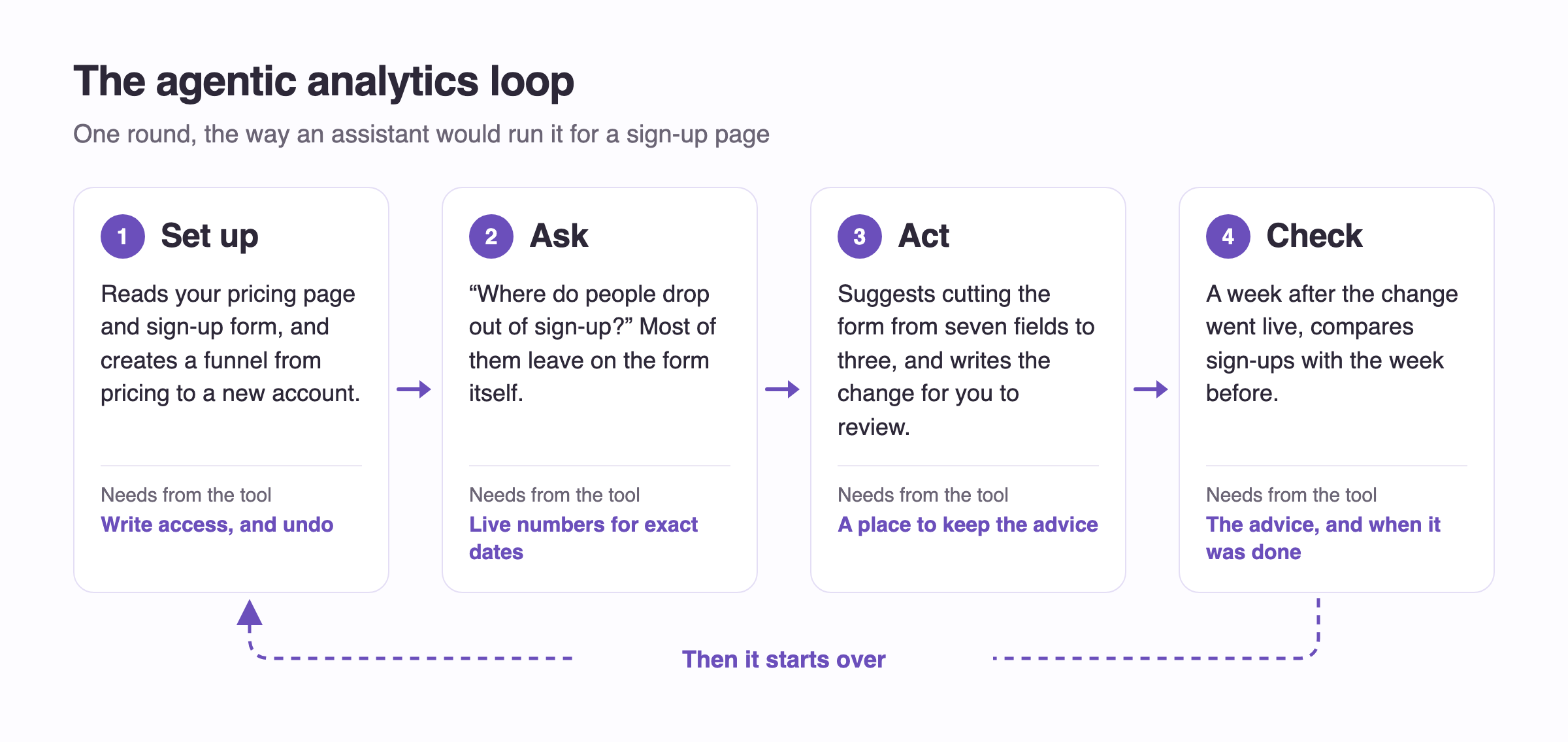
A chat box that explains the chart you are already looking at isn’t that. Neither is pasting a CSV export into ChatGPT. Neither of them can change anything, and both forget everything when the chat ends. For the loop to work, the analytics tool has to give the assistant real tools. One to read live numbers, one to change the setup, and a place to keep what it found.
Where web analytics is going
This part is our opinion. Each point comes with what we saw in the test, so you can judge for yourself how far along it is.
Setup moves to the assistant
Most sites never get their analytics set up properly. Someone adds the script and looks at page views, because deciding which clicks matter and which steps make a funnel is work nobody gets around to. An assistant can read your site and do it in a few minutes. You only want that, though, if you can give it read-only access when you just have questions, and take back what it did when it gets something wrong.
In our test, four servers let the assistant set something up: Privatrak, PostHog, Mixpanel and Matomo. Only ours could take it back again. With the others, whatever the assistant got wrong stayed there until you found it and fixed it by hand. Cloudflare’s server is the other extreme. It is made for all of Cloudflare, not just analytics, so an assistant can change anything the access key allows. Google Analytics’ server can only read, unless you turn writing on when you install it.
You ask instead of opening a dashboard
Most dashboard visits are someone looking for one number. We think that part goes away. You will ask, and the dashboards you keep will be the few things you check every morning, probably built by the assistant as well.
When we answered our ten questions ourselves in the dashboards of Mixpanel, Amplitude and PostHog, each one meant building a chart. That took 6 to 10 clicks, and you had to know what the tool calls things. Through an assistant you just asked, and with a good server it needed about one step per question. To be fair to simple dashboards, Plausible, Fathom, Umami and Pirsch had most answers on the first screen anyway. Nobody needs an assistant for that.
The tool matters more than the model
The MCP server decides how the assistant gets its numbers. Some give it ready-made tools, like “visitors from this day to that day”. Some give it a query language and let it write its own queries. Some have a single box where it types the question in plain English. That choice decided more than the model did.
With ready-made tools the assistant answered in one call. PostHog, Cloudflare and Matomo mostly hand it a query language instead, so it had to write queries, guess field names and try again. LogRocket’s server takes the question in plain English and rewrites it itself. We asked about 17 and 18 November, and in 5 of 10 answers it counted 19 November too, without saying so. We asked every question twice, once with Claude Sonnet and once with Claude Opus. Privatrak, Plausible, Pirsch, Matomo and Cloudflare gave the same numbers both times.
Answers say what they don’t know
Google Analytics counts days in the timezone set for the property, and ours was set to Los Angeles. Its MCP server has no way to ask for days in another timezone. So when we asked about 17 November, every answer covered a window eight hours off from the day we meant. Only Opus noticed and rebuilt the right days from hourly numbers.
We also asked each assistant to write a short report on the two days. Plausible’s assistant saw that the second day was quieter, called it “engagement collapsed” and suggested looking for a bad deploy. There were just fewer visits that day, too few to call anything a collapse, and the answer didn’t say so.
In both cases the model did fine with what it got. What was missing was context in the tool’s answer. Is today still running? Does the data start halfway through the period? Are there enough visits to say anything? Which timezone is “yesterday” in? A good server puts that into the answer.
We checked every number in those 11 reports. None was made up. Every number that didn’t come straight from the tool was worked out from ones that did, like a percentage or a sum. The wrong conclusions came from what the tools had recorded. Still, in a report the assistant’s numbers and its opinions end up in the same sentences, and you can’t tell which is which. In Privatrak the assistant can save its report as an AI review, and the review marks every number Privatrak looked up itself, so you can tell them apart from the assistant’s own words.
Someone checks whether it worked
Today a recommendation mostly ends as a recommendation. Someone acts on it or doesn’t, and nobody looks again. We think this is where assistants will change the most.
Only 3 of the 11 servers could save the report anywhere. PostHog keeps it as a notebook and Mixpanel as a board. That keeps the text, but nothing in it says which advice you followed or what happened after.
This is the part we built Privatrak around. The assistant saves its report as a review, and each recommendation in it has a status (open, done or dismissed) and names the number to watch. When you mark one as done, Privatrak compares that number since then with the same number of days before, once a week has passed. It tells you how the two periods differ, not why, because plenty of other things change in a week. The next time you ask for a review of the same page, the assistant starts with the last one. It checks what you did and how those numbers moved, and doesn’t suggest what you already did or turned down again. Each review builds on the one before, instead of every chat starting from zero. PostHog and Amplitude are working on similar ideas with AI agents of their own.
Bring your own model
Most of the 15 tools now come with an AI of their own. Google Analytics’ Advisor runs on Gemini and Mixpanel’s Agent on Claude. Amplitude, PostHog and LogRocket list OpenAI, Anthropic or Google as model providers. Clarity, Fathom, Mouseflow and Sentry have one too. Matomo, Plausible, Umami, Pirsch and Cloudflare Web Analytics don’t.
We think the AI belongs in the assistant you already use and already have a contract with. Then the analytics tool doesn’t have to send your data to yet another AI company, and you pick the model. Your data still goes to an AI model, of course, the one you chose. MCP doesn’t change that. It just makes it one decision instead of one per tool. Privatrak runs no AI of its own. Reviews are written by your assistant and stored in Privatrak.
AI agents and AI assistants on your site
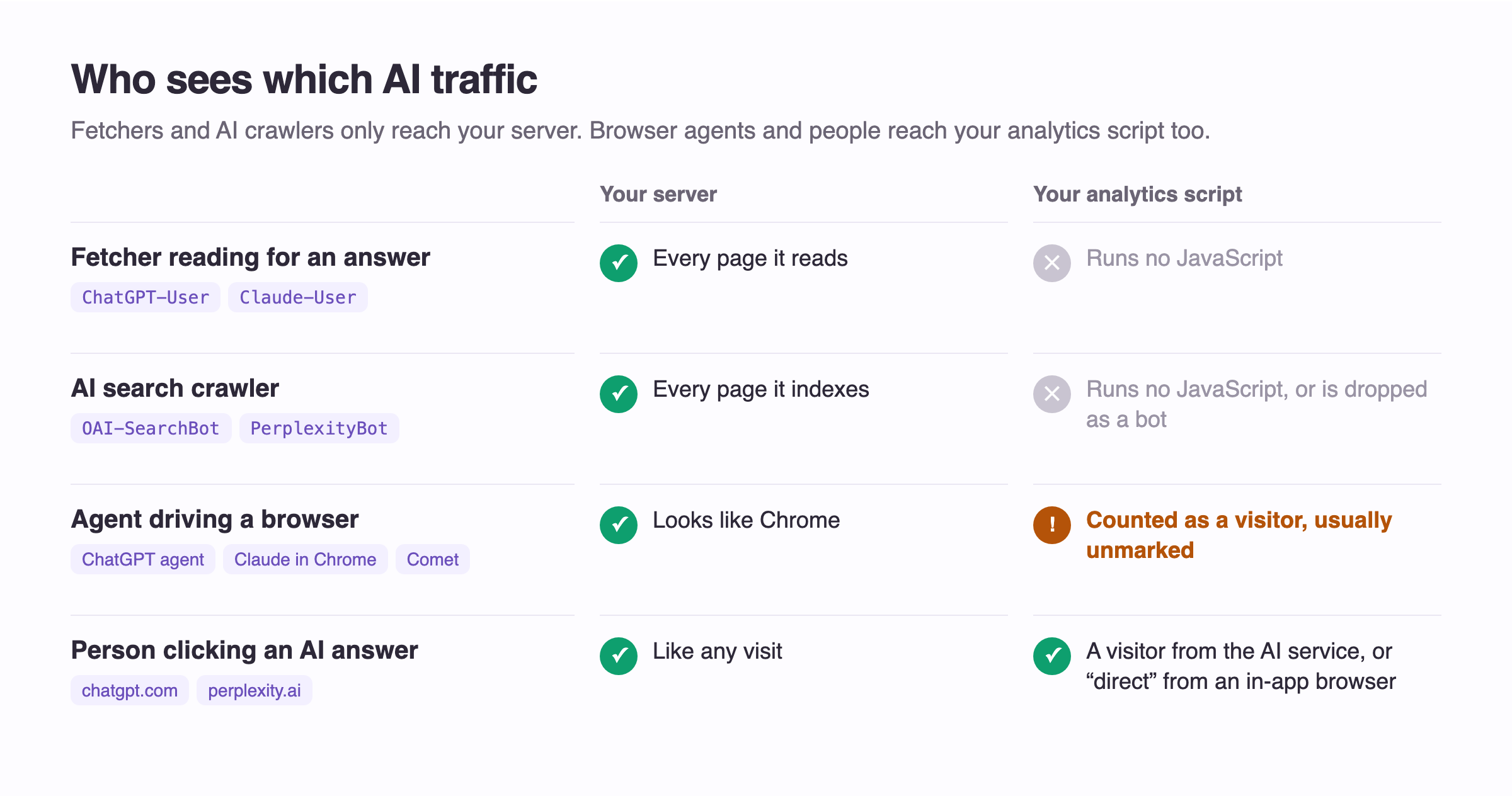
The assistants that read your analytics also read your website, for whoever asked them something. That traffic comes in three kinds, and analytics sees each one differently.
- Fetchers that read a page for an answer. Someone asks ChatGPT or Claude a question, and the assistant fetches your page from its own servers (
ChatGPT-User,Claude-User). They run no JavaScript, so no analytics script ever sees them. Only your server does. - Search crawlers of AI services.
OAI-SearchBot,PerplexityBotand others keep the service’s search index fresh. Only pages in that index can turn up in an answer. - Agents that drive a browser. ChatGPT’s agent, Claude in Chrome, Comet, Manus. They open your pages in a real browser, run your scripts and click around. To analytics they are visitors.
Then there are the people who click a link in an AI answer. They are normal visitors, with an AI service as their source.
What 15 tools made of AI fetches
Because fetchers only show up on your server, an analytics tool can only count them if it gets the requests from your server. Ten of the 15 tools have a way to do that. In the field test we set it up in each of them, the way its own docs describe, and had ChatGPT, Claude and Gemini each fetch a page.
| What the tool did with the fetches | Tools |
|---|---|
| Named them as AI fetches | Privatrak, Matomo, PostHog |
| Counted each fetch as a visitor’s page view | Mixpanel, Amplitude, Google Analytics (which called ChatGPT’s fetcher a “smart tv”) |
| Dropped them | Plausible, Umami; nothing appeared in Pirsch |
| Recognised only ChatGPT’s, as a known bot | Cloudflare |
| Have no server-side option | Fathom, Clarity, Mouseflow, LogRocket, Sentry |
Named them as AI fetches
- Tools
- Privatrak, Matomo, PostHog
Counted each fetch as a visitor’s page view
- Tools
- Mixpanel, Amplitude, Google Analytics (which called ChatGPT’s fetcher a “smart tv”)
Dropped them
- Tools
- Plausible, Umami; nothing appeared in Pirsch
Recognised only ChatGPT’s, as a known bot
- Tools
- Cloudflare
Have no server-side option
- Tools
- Fathom, Clarity, Mouseflow, LogRocket, Sentry
Gemini’s app fetched our page calling itself just Google, and no tool tied that to Gemini. Google doesn’t document it as Gemini’s, so Privatrak keeps it as an unnamed crawler. We only put a request under an AI service when that company documents the user agent.
Why fetches matter for SEO and GEO
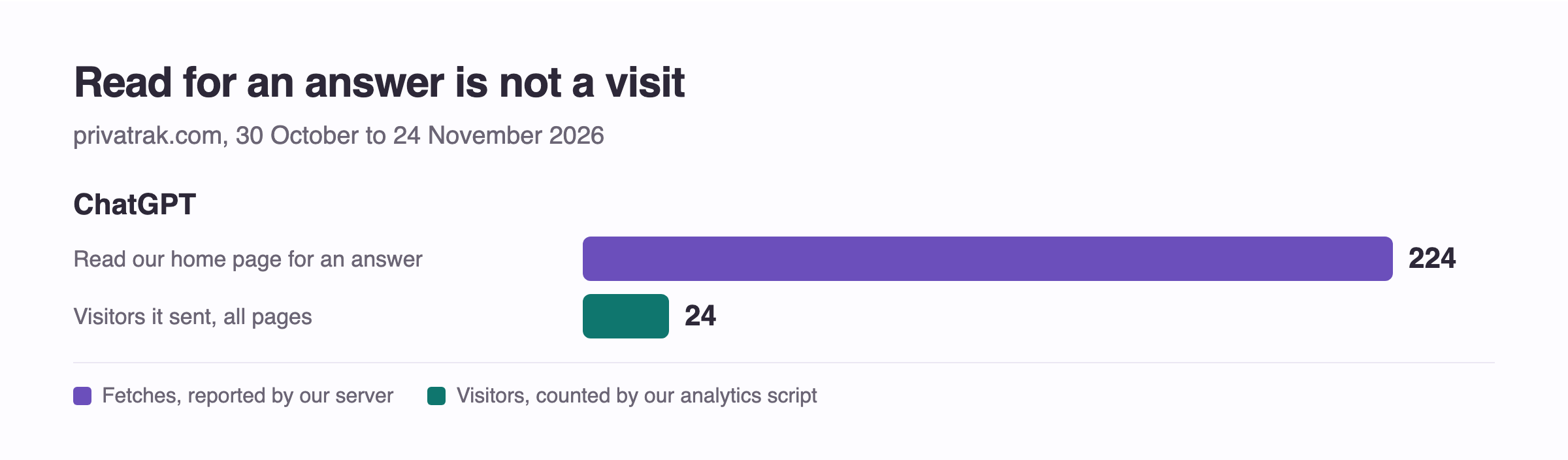
If you care about showing up in AI answers (people call it GEO or AEO), a fetch is about as close to an impression as you will get. An assistant read the page because someone asked something it answers. That doesn’t mean the person saw your page, and it isn’t a visit. From 30 October to 24 November, ChatGPT read our home page 224 times for an answer and sent us 24 visitors in total. Both numbers are useful, but only apart. In our test, Mixpanel, Amplitude and Google Analytics counted every fetch we sent them as a page view. There, those 224 reads would have looked like 224 visits to our home page that no person ever made.
The people who do click through are hard to count too, because a link opened in an app arrives without a referrer. The ChatGPT app works around that by adding utm_source=chatgpt.com to its links itself. Even then, the tools in our test read that tag in five different ways: as an AI channel, a referrer, a campaign, “Other Advertising”, or not at all. The Claude app adds nothing, so someone who clicks a link there shows up as direct traffic.
In Privatrak the AI services page shows three numbers for each assistant: pages it read for an answer, pages its search crawler read, and visitors it sent. For the first two, your server passes the crawler requests on to Privatrak. It sends only those, nothing about people. Report server requests shows the setup for WordPress, a Cloudflare Worker, Next.js and Nuxt. If you want to know which crawler does what, read ClaudeBot, GPTBot, ChatGPT-User: which AI crawler does what, or paste a user agent from your log into the user agent checker.
Browser agents look like people
When we sent 23 agents to our site, most of the ones that drive a browser looked exactly like a person in Chrome. ChatGPT’s agent, Claude in Chrome, Comet and Grok reported no automation, sent a normal Chrome user agent, and several even came from our own home internet connection. Filtering out bots by their name or by their address catches none of them. Only a few said what they were. Claude Cowork and some developer tools set navigator.webdriver, and Manus named itself in its user agent and signed its requests.
When a browser does say it’s automated, what happens depends on the tool. Plausible’s and Mouseflow’s scripts then send no data at all, PostHog’s almost none, and most tools drop known bots without telling you how many. That made sense when every automated visit was a bot. An agent sent by someone comparing your prices is closer to a customer, though. We think it should be counted and labelled, not thrown away.
How Privatrak marks automated visits
Privatrak marks a visit as automated in three cases.
- The user agent names a browser-automation tool or an AI agent that identifies itself, such as HeadlessChrome, Playwright, Manus, Operator or Google’s agent.
- The browser says a program is driving it (
navigator.webdriver). - The pointer moves like a program’s. A person’s mouse reaches a button in many small steps. Every agent we tested jumped onto its target in one move and barely moved otherwise. Once a click on a page follows such a jump, and no click there looked like a person’s, that click and everything after it on the page is marked. Touch and keyboard are never judged, so people using Voice Control or other accessibility tools stay people. The tracker only sends whether a visit looked automated, never the mouse movements themselves. An agent that clicks only once per page stays unmarked.
Marked visits are stored and counted like any other, and you decide whether to leave them out. The Automated visit filter in Insights and on the Events page shows them alone or hides them, and AI reviews only count views by people. Crawlers that say what they are are never stored as visits and don’t count toward your event limit.
Where 15 tools stand today
The “Right answers” column counts how many of our ten questions each tool’s MCP server answered exactly right. Google Analytics got none, because all its numbers were for days in Los Angeles time instead of the days we asked about. Sentry records errors, not visits, so it had almost nothing to answer with. Umami, Amplitude and Mouseflow only offer their servers on paid plans, so we couldn’t test them.
| MCP server | Right answers (of 10) | Sets things up | Keeps a report | Built-in AI | |
|---|---|---|---|---|---|
| Privatrak | Official, hosted | 7 | Yes, with undo | Yes, as a review | None |
| Plausible | Community | 7 | No | No | None |
| Pirsch | Community | 6 | No | No | None |
| Umami | Official, paid plans | Not tested | – | – | None |
| Fathom | Community only | No usable server | – | – | Luna (chat) |
| PostHog | Official, hosted | 7 | Yes | Yes, as a notebook | PostHog AI, Self-driving |
| Mixpanel | Official, hosted | 7 | Yes, onto a board | Yes, as a board | Mixpanel Agent |
| Amplitude | Official, paid plans | Not tested | – | – | AI agents, Ask Amplitude |
| Matomo | Official, hosted | 1 | Yes, through a general API tool | No | None |
| LogRocket | Official, hosted | 4 | No | No | Galileo (Pro plan) |
| Clarity | Official, local | 1 | No | No | Copilot |
| Mouseflow | Official, paid plans | Not tested | – | – | Mina AI (beta) |
| Sentry | Official, hosted | 0 | No | No | Seer (paid add-on) |
| Cloudflare Web Analytics | Cloudflare’s general server | 2 | Yes, anything its token allows | No | None |
| Google Analytics | Official, local | 0 | Only with a start-up flag | No | Analytics Advisor (beta) |
Privatrak
- MCP server
- Official, hosted
- Right answers (of 10)
- 7
- Sets things up
- Yes, with undo
- Keeps a report
- Yes, as a review
- Built-in AI
- None
Plausible
- MCP server
- Community
- Right answers (of 10)
- 7
- Sets things up
- No
- Keeps a report
- No
- Built-in AI
- None
Pirsch
- MCP server
- Community
- Right answers (of 10)
- 6
- Sets things up
- No
- Keeps a report
- No
- Built-in AI
- None
Umami
- MCP server
- Official, paid plans
- Right answers (of 10)
- Not tested
- Sets things up
- –
- Keeps a report
- –
- Built-in AI
- None
Fathom
- MCP server
- Community only
- Right answers (of 10)
- No usable server
- Sets things up
- –
- Keeps a report
- –
- Built-in AI
- Luna (chat)
PostHog
- MCP server
- Official, hosted
- Right answers (of 10)
- 7
- Sets things up
- Yes
- Keeps a report
- Yes, as a notebook
- Built-in AI
- PostHog AI, Self-driving
Mixpanel
- MCP server
- Official, hosted
- Right answers (of 10)
- 7
- Sets things up
- Yes, onto a board
- Keeps a report
- Yes, as a board
- Built-in AI
- Mixpanel Agent
Amplitude
- MCP server
- Official, paid plans
- Right answers (of 10)
- Not tested
- Sets things up
- –
- Keeps a report
- –
- Built-in AI
- AI agents, Ask Amplitude
Matomo
- MCP server
- Official, hosted
- Right answers (of 10)
- 1
- Sets things up
- Yes, through a general API tool
- Keeps a report
- No
- Built-in AI
- None
LogRocket
- MCP server
- Official, hosted
- Right answers (of 10)
- 4
- Sets things up
- No
- Keeps a report
- No
- Built-in AI
- Galileo (Pro plan)
Clarity
- MCP server
- Official, local
- Right answers (of 10)
- 1
- Sets things up
- No
- Keeps a report
- No
- Built-in AI
- Copilot
Mouseflow
- MCP server
- Official, paid plans
- Right answers (of 10)
- Not tested
- Sets things up
- –
- Keeps a report
- –
- Built-in AI
- Mina AI (beta)
Sentry
- MCP server
- Official, hosted
- Right answers (of 10)
- 0
- Sets things up
- No
- Keeps a report
- No
- Built-in AI
- Seer (paid add-on)
Cloudflare Web Analytics
- MCP server
- Cloudflare’s general server
- Right answers (of 10)
- 2
- Sets things up
- Yes, anything its token allows
- Keeps a report
- No
- Built-in AI
- None
Google Analytics
- MCP server
- Official, local
- Right answers (of 10)
- 0
- Sets things up
- Only with a start-up flag
- Keeps a report
- No
- Built-in AI
- Analytics Advisor (beta)
Privatrak, our own tool, got as many answers right as any other, and a few things set it apart in the test. Its server was the only one that could undo what the assistant set up. It keeps the assistant’s report as a review, marks which numbers Privatrak looked up itself, and follows up once you mark a recommendation as done. You connect by signing in and choose read-only or read-and-set-up access. And because Privatrak needs no cookie banner, it also counts the people who would decline one. The tools that wait for consent (PostHog, Mixpanel, Amplitude, Matomo and Sentry) each missed 16 to 19 such visits over the two test days, so their assistants never saw them.
The other tools fall roughly into four groups. Simple dashboards like Plausible, Fathom, Umami, Pirsch and Cloudflare answer most questions on the first screen, and where they have a server it answers just as well. None of them can set anything up. Product analytics tools like PostHog, Mixpanel, Amplitude and Matomo can do a lot through an assistant, but they are built for product teams with time to learn them. Their servers are big, few of them keep reading and writing apart, and the visitors who decline cookies are missing from their numbers. Session tools like Clarity, LogRocket, Mouseflow and Sentry answer with a plain-language box or a list of recorded sessions, so they often answered for other days and had trouble counting. And Google Analytics gets close, but always in the property’s timezone.
Google Analytics’ MCP server, tested
Google’s official Google Analytics MCP server is what most people try first. It runs on your own machine or server, with your own Google Cloud sign-in. Version 1.0 came out on 3 November 2026, and we tested it on 19 November.
For answers it has one report tool, run_report, that takes any GA4 dimension and metric, so you work with GA4’s field names the whole time. Our ten questions took 13 calls, and one failed because funnels want pageLocation, not pagePath.
The real problem is the timezone. Reports always follow the property’s timezone, and you can’t ask for another. On our property, set to Los Angeles, “17 to 18 November” meant 17 November 08:00 to 19 November 08:00 UTC. Measured against that window the numbers were close. Measured against the days we asked about, every answer was off.
By default it can only read. It has three write tools, for notes on the timeline, custom dimensions and key events, but they only appear if you start it with --allow-write and give your Google sign-in permission to edit. Google’s setup guide does neither. There is also nowhere to save a report. In the report test the assistant still found the broken link and the test traffic, and rebuilt the right days from hourly numbers.
What to check before you choose
If you want an assistant to do your analytics, these are the questions we would ask of any tool.
- Is there an official server you can reach by URL? Then an app like Claude can connect by signing in, with nothing to install.
- Does it take exact dates and say which timezone? Otherwise “last week” is a guess.
- Are reading and writing separate permissions? You should be able to give an assistant read-only access.
- Can changes be undone? Or at least tried as a dry run first. In our test only Privatrak’s server could undo what the assistant set up.
- Do answers say what they can’t know? A day that isn’t over, a period that starts before the data, too few visits.
- Can a report be kept and checked later? Otherwise every recommendation is gone when the chat ends.
- Are AI fetches and automated visits counted apart from people? And are they labelled or quietly dropped?
- Is the built-in AI optional? Your own assistant should be enough.
We built Privatrak around this list, so it’s no surprise it does well on it. You connect to a hosted server by signing in and choose read-only or read-and-set-up access. Every change lands in a run you can undo in one step. AI reviews keep their numbers and follow up on recommendations you mark as done. And for AI traffic on your site there is the AI services report and the filter for automated visits. The AI assistant guide shows how to connect Claude, Codex or Cursor.
How we tested
The site, the visits and the scoring are all in the paper. The MCP test is in chapter 8, the dashboard test in chapter 7, and the AI fetches and the browser agent in chapter 11. In short:
- Ten questions with known answers about 17 and 18 November (visitors, sources, a funnel, downloads, rage clicks, purchases and a few more), asked through 11 MCP servers on 19 November.
- Claude Code only, with Claude Sonnet in the first round and Claude Opus in the second. One run per model and task.
- A report test (“write me a short report on 17 and 18 November”) and a setup test (a goal and a dashboard, then clean-up) on every server that could do them.
- We checked vendor facts against each vendor’s documentation on the date at the top. These tools change quickly, so check again before you rely on one.