Documentation
Set up Privatrak, name what matters to you and read every report.
AI services
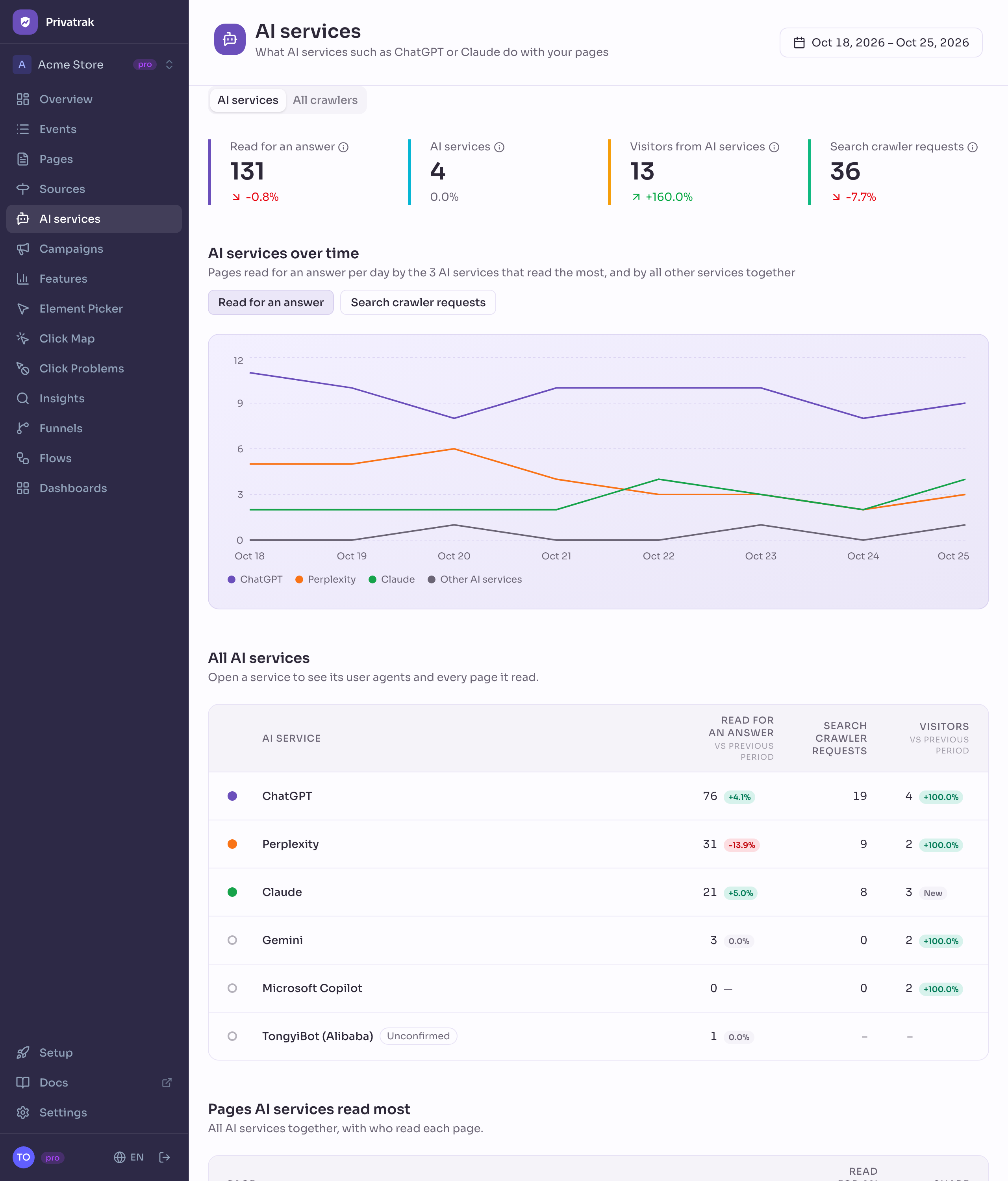
The AI services page shows how AI services such as ChatGPT, Claude and Perplexity use your pages. You see which pages they read to answer questions, how often their search crawlers came by, and how many visitors they sent you. Use it to track AI crawlers and find out which of your pages they read most.
What you need
Read for an answer and Search crawler requests come from requests that your server reports to Privatrak, because AI services read your pages without running your JavaScript. Report server requests shows the setup for WordPress, Cloudflare, Next.js, Nuxt and other servers. Visitors need nothing extra: Privatrak counts them like every other visitor.
Until your server reports requests, the page shows Report server requests with a link to that setup, and the list has the column Visitors only.
Read the numbers
Each AI service has three numbers. They count different things, so Privatrak never adds them together.
- Read for an answer: how often the service read one of your pages to answer someone’s question. Each read is one request, one time the service asked your server for the page. This is not proof that the person saw your page. Requests for
robots.txt, sitemaps andllms.txtdo not count. - Search crawler requests: how often the service’s own search crawler, such as OAI-SearchBot, requested a page. It collects pages for the service’s search.
- Visitors: people who clicked a link in the service and came to your site. These are the visitors you also see on Sources.
At the top of the page, four numbers show the totals for the date range, each with its change against the previous period: Read for an answer, AI services (how many services read at least one of your pages), Visitors from AI services and Search crawler requests.
Choose which AI services the chart shows
AI services over time shows the 3 services with the most reads per day, plus one line for all other services. Switch between Read for an answer and Search crawler requests to chart the other number. Use the dot next to a service in the list to show it in the chart, up to 10. Reset chart brings back the top 3.
See every AI service
All AI services lists each service with its numbers and their change. Click a service’s name to open its details.
Under it, Pages AI services read most lists the pages that services read most for an answer, with the services that read each one. Click a page’s name to open it.
Unconfirmed crawlers
Some crawlers say they read pages for an AI service, but the company behind them does not document that name. Privatrak lists each one under the name it gives itself, such as TongyiBot, with the badge Unconfirmed. A crawler goes under an AI service only when the company documents it.
What an unconfirmed crawler read is listed and charted, but it is not part of Read for an answer. The tooltip of that number shows how many reads came from unconfirmed crawlers.
See every crawler
Open the All crawlers tab to see every crawler that came by, not only AI services. Crawlers are not counted as visitors and do not use your monthly event limit. Two numbers show what they did:
- Requests reported by your server: every request a crawler made to your site, as your server reported it. Most crawlers never run your JavaScript and appear only here.
- Page views seen by the tracker: page views of crawlers that ran your JavaScript.
One visit of a crawler can be in both numbers, so Privatrak never adds them together.
The list groups crawlers by what they are for: AI answers, AI search, AI training, Search engines, Link previews, SEO tools, Monitoring, Advertising, Archives and Other. The chart Crawlers over time draws one line per group, and you switch it between Requests and Page views.
Under AI answers, See them by AI service takes you back to the first tab.
Open an AI service, a crawler or a page
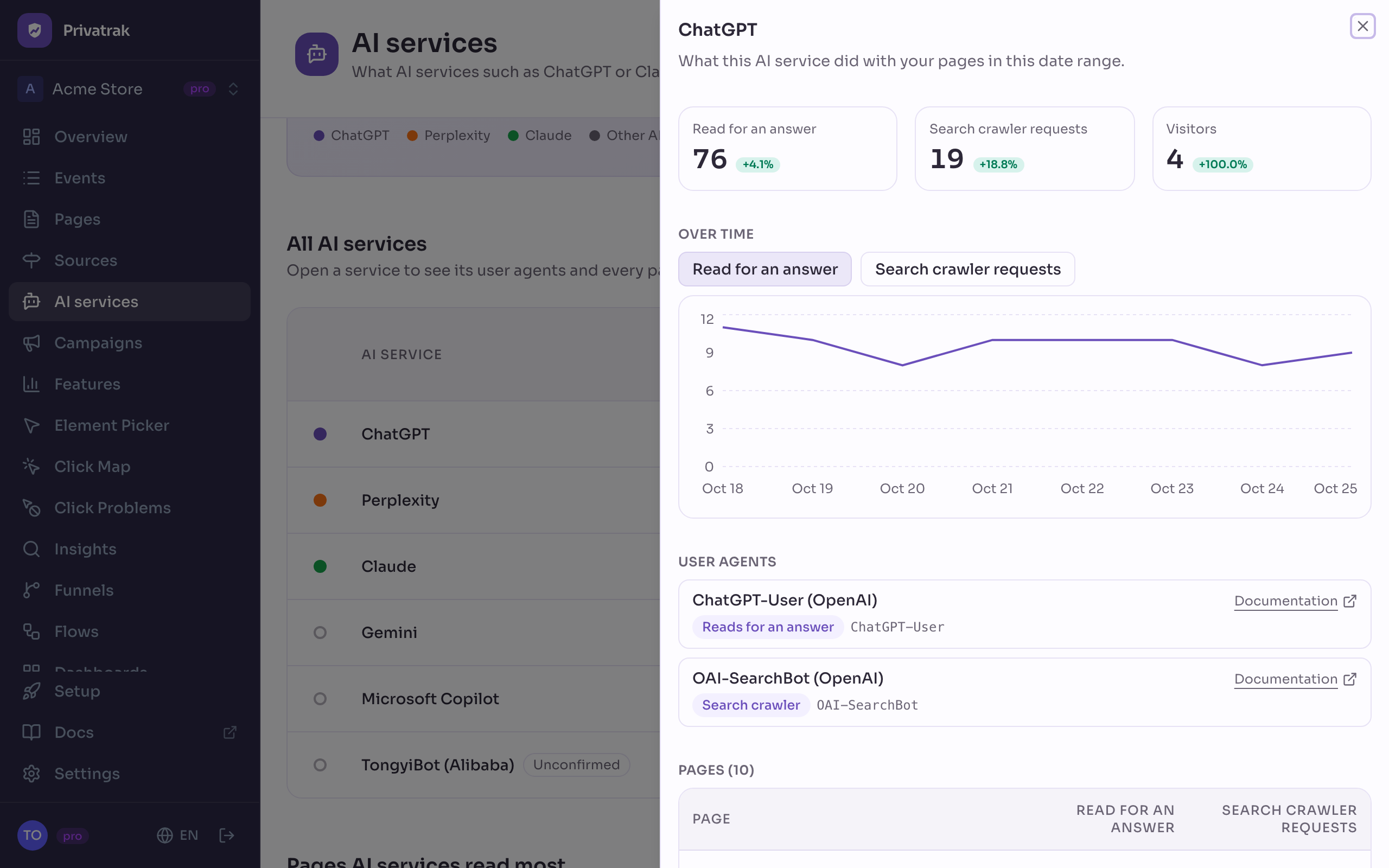
Click a name in any list to open its details in a side panel. The list stays where it is.
- An AI service: its numbers with their change, a chart of its reads or requests per day, its User agents and every page it read or requested. The user agents are the names its crawlers use to identify themselves. Each one is marked Reads for an answer or Search crawler and links to the company’s Documentation.
- A crawler: the same for one crawler, with its requests and its page views side by side.
- A page: the same panel as on Pages, with the section Read by AI services for an answer. It shows how often AI services read this page and which ones. It also says how often the services’ search crawlers requested the page. Those requests are not in the number above.
Next steps
- Report server requests: set up the numbers for Read for an answer and Search crawler requests.
- Sources: see where all your visitors came from, AI services included.
- We sent 23 AI agents to our website: how chatbots and AI agents show up in analytics.