Documentation
Set up Privatrak, name what matters to you and read every report.
Sources
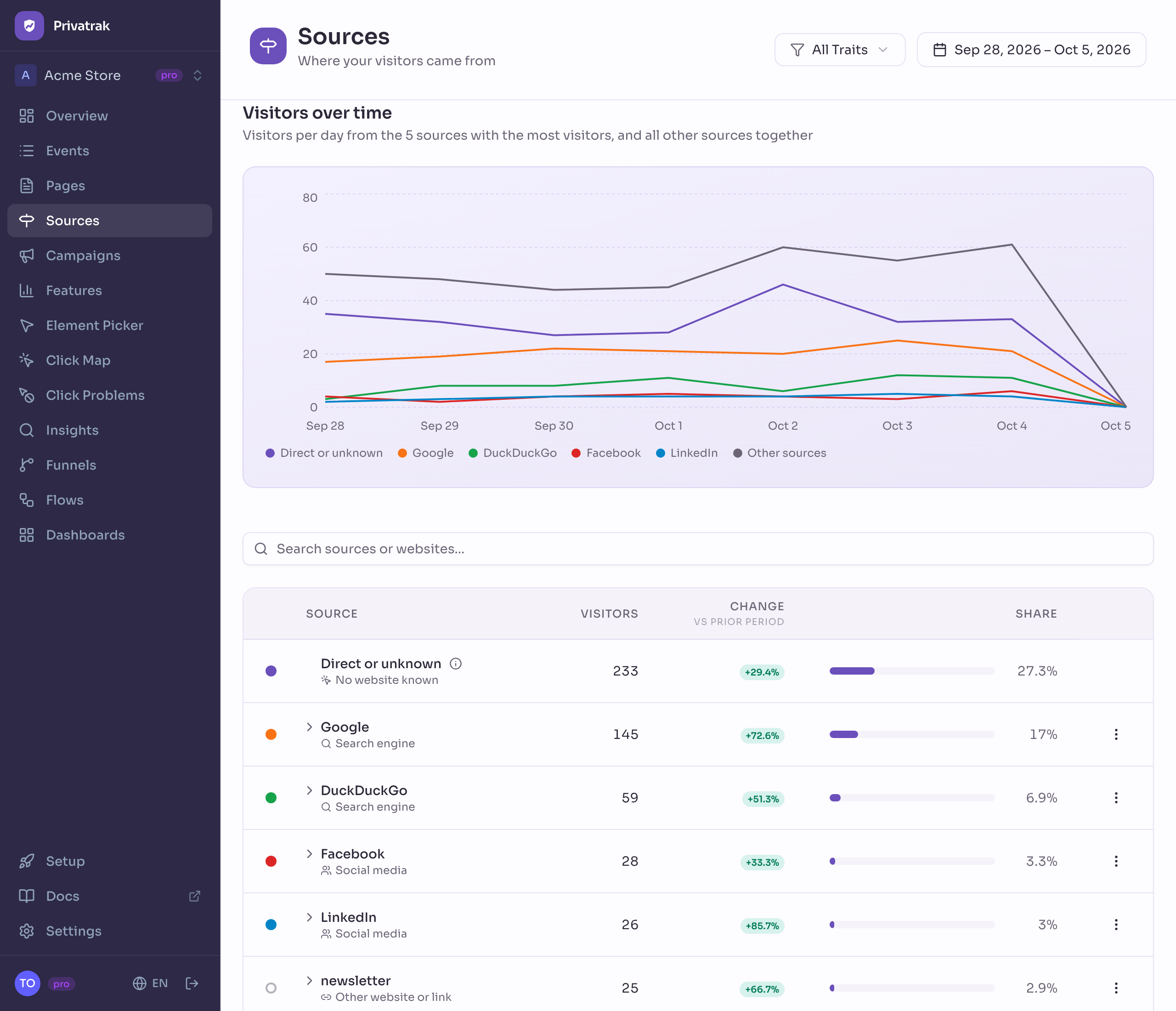
The Sources page shows where your visitors came from: a search engine, a social network, an AI assistant, another website or a link in your newsletter. You see which traffic sources bring the most visitors and how that changes over time.
How a visitor gets a source
Privatrak counts each visitor once per day, under whatever brought them to their first page that day. A visitor who arrives from Google in the morning and through your newsletter in the afternoon counts once that day, for Google.
A campaign link decides the source, even when the visitor also came from another website. A link with ?utm_source=google counts for Google. A link with ?ref= counts its value as the source. Without either, the source is the website the visitor came from.
Visitors from campaign links also appear on Campaigns, by campaign name and link variant.
Kinds of traffic sources
Privatrak sorts every source into one kind, which you see under its name in the list. On the Overview, the bar in Top Sources shows how your visitors split between the kinds:
- Search engine: Google, Bing, DuckDuckGo, Ecosia and others.
- Social media: LinkedIn, X, Reddit, YouTube, Hacker News and others.
- AI assistant: ChatGPT, Perplexity, Claude, Gemini and Microsoft Copilot, when an answer links to your site.
- Other website or link: every other website, mail and chat apps such as Gmail, Outlook and Slack, and your own campaign links.
- No website known: the row Direct or unknown. These visitors typed your address, used a bookmark, or came from an app that does not say where its visitors come from. A large share here is normal.
The websites behind a source
A source can stand for several websites. Google, for example, is google.com, google.de and more. Open a row to see each website with its own visitors.
A source from your campaign links, such as newsletter, lists the websites the link was opened from. No website named collects the visitors whose browser named none.
Visitors without a source
Two groups of visitors are not listed as a source. A line under the list says how many there were:
- Visitors from your own site: they opened their first page of the day from a page of your site, for example after a reload. Visits from the websites under Settings › Privacy › Allowed domains count as your own too.
- Visitors without a page view: they did something on your site that day but opened no page, for example because the page was still open from the day before.
Chart and search
The chart shows visitors per day from the 5 biggest sources, plus one line for all other sources. Click the dot next to a source to show it in the chart, up to 10. Reset chart brings back the top 5.
Search finds a source by its name or by any of its websites, and the chart follows your search. Use All Traits to see the sources of one group of visitors.
What you can do with a source
Each source’s menu has these actions:
- Show events from this source: opens Events with the page views that came from this source, so you see where these visitors landed.
- Open website: opens the source’s busiest website in a new tab.
- Create feature: opens the feature rule form, filled in for page views from this source. Every website and campaign link of the source becomes an alternative, and you see what the rule would count before you save it.
Use that feature as the first step of a funnel. It shows whether the visitors from this source go on to sign up or buy.
Next steps
- Campaigns: see which campaigns and link variants bring visitors.
- Set up and track a campaign: measure what your next newsletter or ad brings.
- Funnels: see whether the visitors from a source sign up or buy.