Documentation
Set up Privatrak, name what matters to you and read every report.
See what shoppers search for and click
WordPress records every search your shoppers make, and Privatrak can name any button your theme has, so you see not just what people buy but what they're looking for and where they click on the way there.
Before you start
The plugin records page views automatically, including WordPress's own search box, so the steps below need no extra setup.
1. See what shoppers search for
When someone searches your store, WordPress puts the search term in the page's address as the parameter s, for example /?s=kettle&post_type=product. Privatrak records that address with the page view, so you can break page views down by it.
Open Insights. Under Event type, choose Pageviews. Under Breakdown, choose URL parameter and enter s. Click Run Query, then Table.
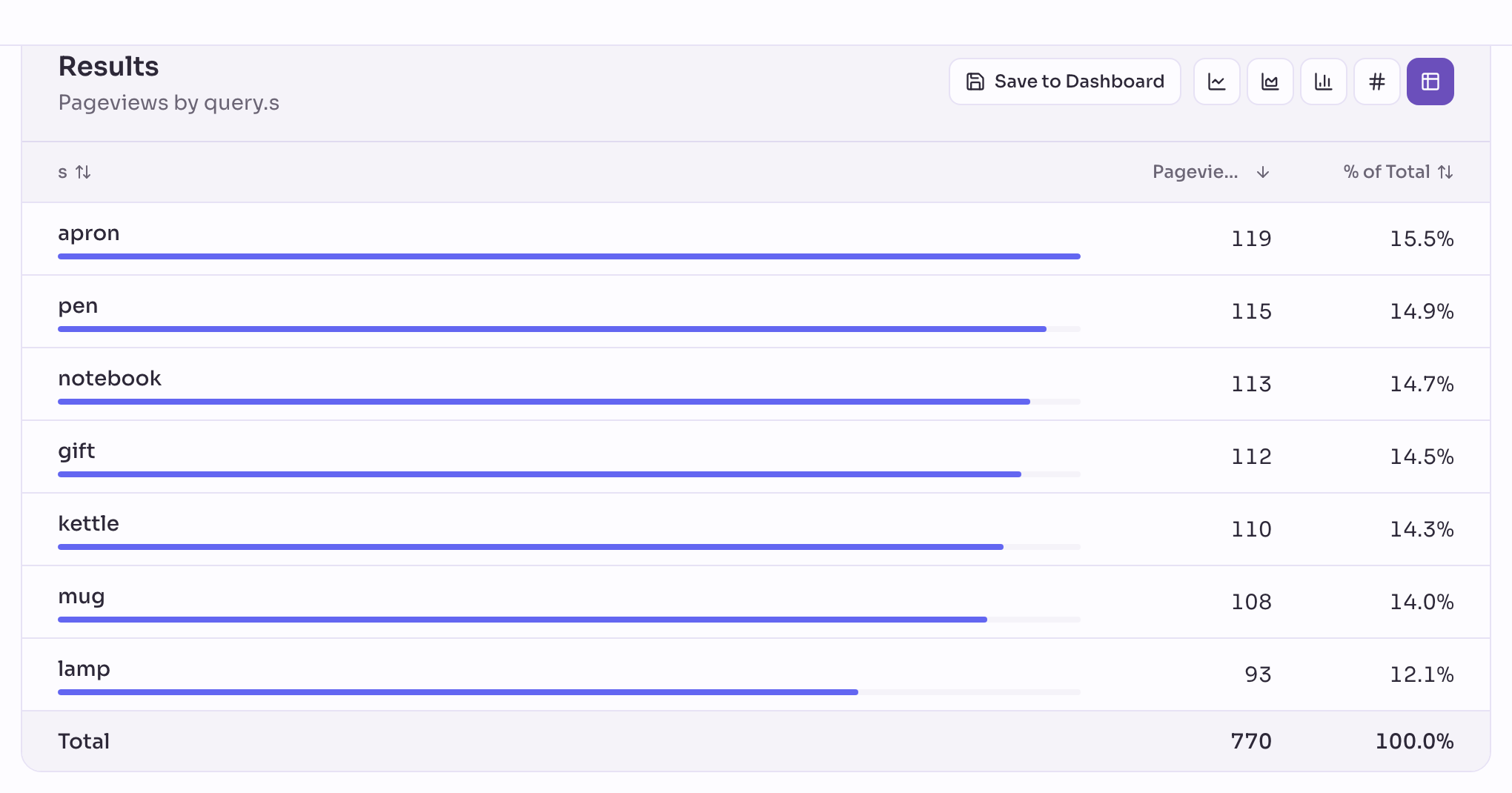
A search term is what a visitor typed, so treat it like anything else people type into your site. If you'd rather not record it, add s under PII URL parameters in Settings › Privacy: Privatrak then replaces it with :redacted.
2. Name any button without code
Not every button on your site is one the plugin names on its own. With the Element Picker, you click a button on your own site and give it a name, without writing or changing any code.
A size guide link, a wishlist button or any other control your theme adds works the same way: open the Element Picker, click it, and name it. From then on, Insights and WooCommerce analytics count it like any other feature.
3. See what people click on a product page
The Click Map shows every recorded click on one page of your site, laid over the page itself, so you see at a glance what shoppers reach for on a product page: the add to cart button, a size option, a review, or a link you hadn't thought to check.
Next steps
- Element Picker: name any button or link on your site by clicking it.
- Click Map: see every click on a page, laid over the page itself.
- WooCommerce analytics: everything Privatrak records in your store without any setup.