Documentation
Set up Privatrak, name what matters to you and read every report.
Run an A/B test
An A/B test, also called a split test, shows which of two versions of a page brings more sign-ups or sales. Your site shows some visitors version A and others version B, and Privatrak counts how each version converts. This guide sets up an A/B test step by step, from choosing the goal to comparing the results.
The example in this guide
Larkmoor Coffee Roasters sells coffee, brewing gear and mugs in its online shop. It tests two versions of its checkout, v1 and v2, and wants to know which one turns more carts into orders.
Before you start
Your site needs to show two versions and decide which visitor sees which. How it decides is up to your site: for example by account for signed-in visitors, with a separate link for each version in an ad or newsletter, or with the A/B testing or feature flag tool you already use. Keep each visitor on one version where you can, so the comparison stays clean. Larkmoor’s shop picks v1 or v2 at random when it starts, and the visitor keeps it for the visit.
Privatrak needs to record the result you want to count. Larkmoor’s thank-you page sends the custom event Purchase with track(), and a feature rule names the checkout form Place order. Features shows how to name your own.
1. Decide what counts as success
Choose one goal that both versions lead to, such as a purchase, a sign-up or a started trial. It becomes the last step of your funnel. Larkmoor’s goal is Purchase, the order its thank-you page reports.
2. Create the funnel before the test starts
Do this before the first visitor sees the new version. A funnel counts from the day you create it, and earlier days stay empty. When counting starts has the details.
Open Funnels and click New Funnel. Then:
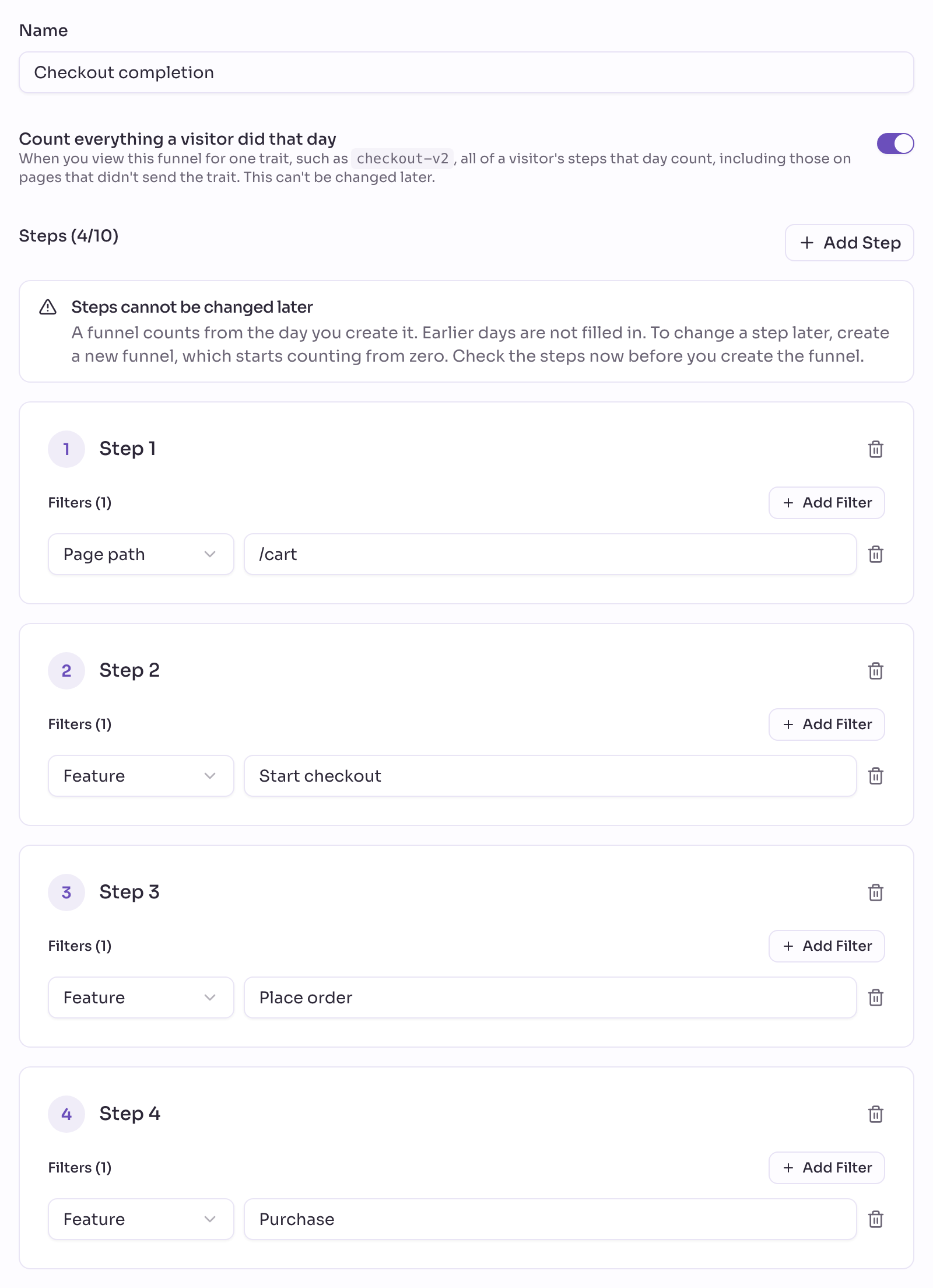
- Give it a name you’ll recognise. Larkmoor calls it
Checkout completion. - For Step 1, click Add Filter, choose Page path and enter the page your test starts from. Larkmoor uses
/cart, the page with the Checkout button. - Click Add Step for each step in between and choose Feature. Larkmoor adds
Start checkout, the Checkout button in the cart, andPlace order, the checkout form. Steps in between show where visitors drop off. - Click Add Step once more and choose your goal, here Feature
Purchase. - Leave Count everything a visitor did that day on. A visitor’s purchase on the thank-you page then counts for the version they saw, even when only the tested page sends the version.
- Click Create Funnel.
The steps and this switch can’t be changed later, so check them before you save. Read a funnel for one group of visitors explains both ways a funnel can count.
3. Send the version as a trait
Each version tells Privatrak which version it is by sending a trait when the tracker loads. A trait is a word your site sends with every event. On a page that shows version 2, add it to the script tag:
<script
  src="https://api.privatrak.com/tracker.js"
  data-api-key="your-website-key"
  data-traits="checkout-v2"
  defer
></script>
Or set it from your code. Larkmoor does this once, when the shop starts:
const checkout = Math.random() < 0.5 ? 'v1' : 'v2';
window.tracker.setTraits([`checkout-${checkout}`]);
Visitors on the other version send checkout-v1. Privatrak needs no cookie for this, because each page says which version it showed.
Larkmoor’s shop is a single-page app, so the trait it sets at the start stays on every event while the visitor moves through the shop in that tab. On a site where every page loads anew, send the trait at least on the page you test.
Each version is one trait key, so a test with two versions uses two of your plan’s trait keys.
Never put anything that identifies a person in a trait, such as an email address or an account ID. Keep personal data out explains why.
4. Let the A/B test run
Start showing both versions, and change nothing else on the pages while the A/B test runs. Let it run until each version has had a good number of visitors before you decide. A few days with a handful of purchases can tip either way.
5. Compare the conversion rate of each variant
Open your funnel in Funnels. Under All Traits, choose checkout-v1 and note the Overall Conversion and the drop-off between the steps. Then choose checkout-v2 and keep the same date range.
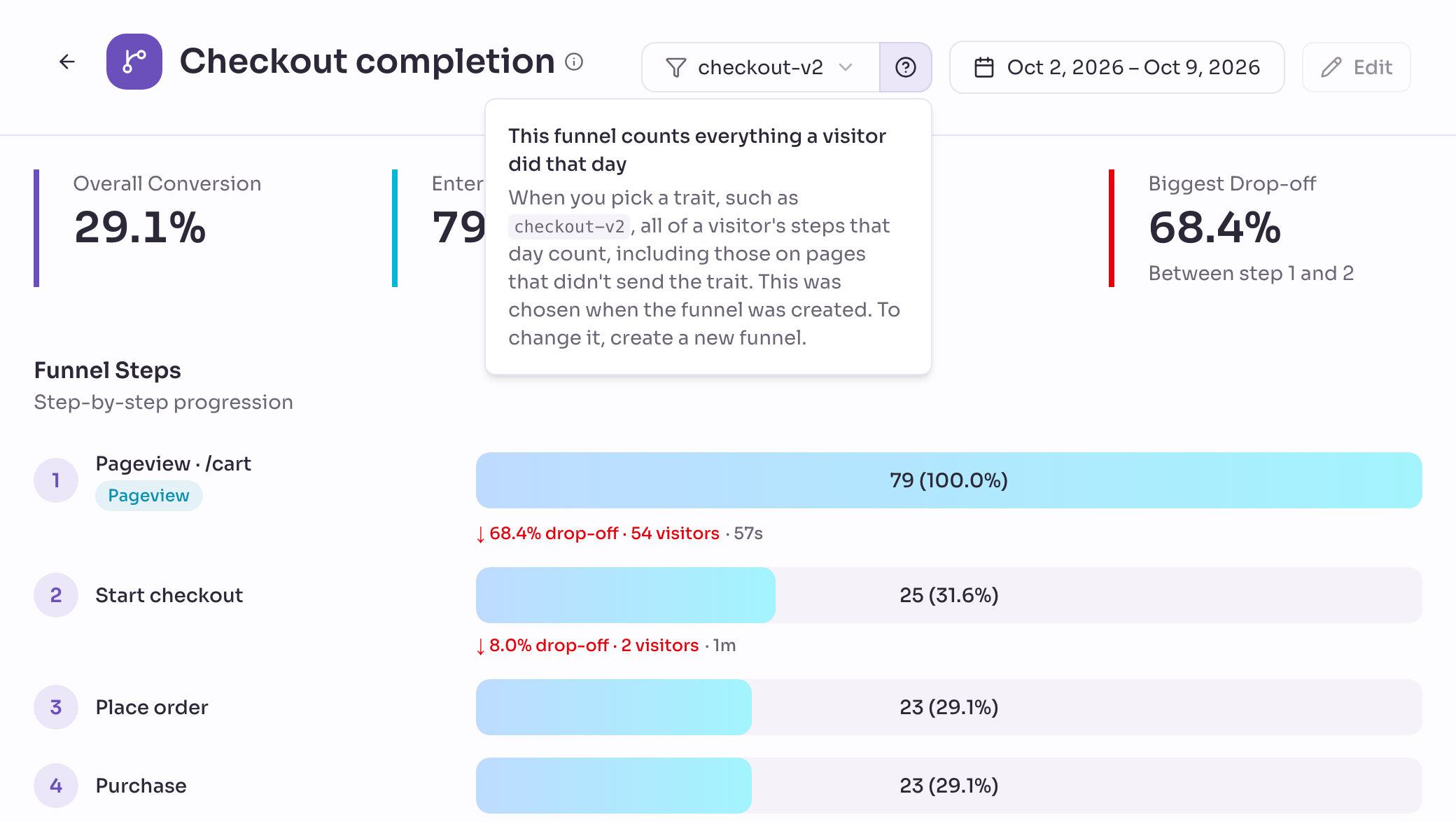
Privatrak shows the numbers for each version. Which version wins is your decision.
You can also ask your AI assistant: “How does checkout-v2 convert compared to checkout-v1 in the Checkout completion funnel?”
See each version on other reports
The funnel tells you which version leads to the goal. Other reports show what visitors did on each version, with the same All Traits choice at the top:
- Overview: how many visitors each version had, and its top features and pages.
- Features: how often each feature was used on each version, such as
Place orderorAdd to cart. - Pages, Sources and Campaigns: the page views of each version and where its visitors came from.
- Dashboards: the choice at the top applies to every widget at once.
- Insights: add the filter Trait for one version, or choose Trait under Breakdown to see both versions side by side, such as the
Purchaseevents per day.
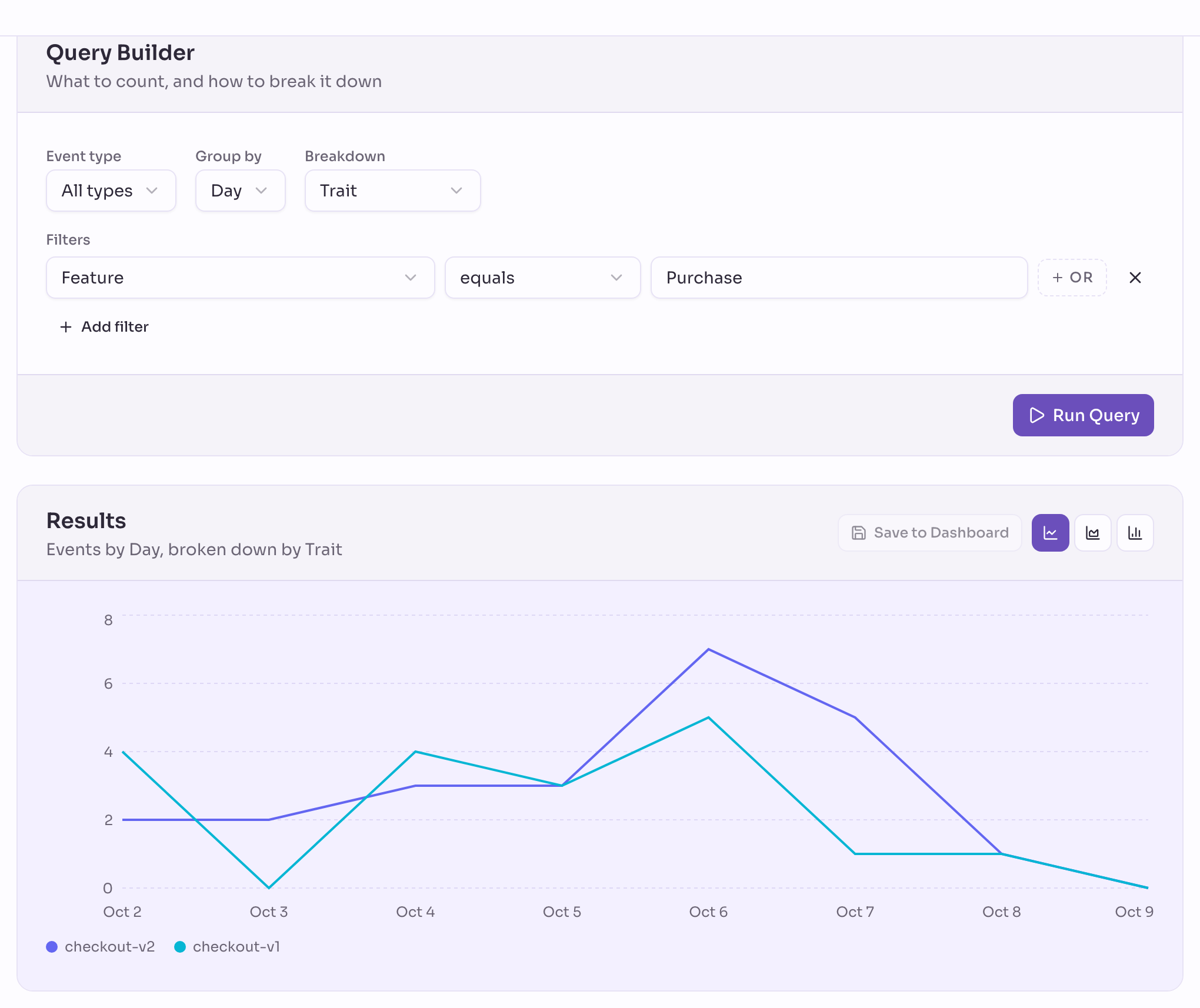
These reports count the events that carried the trait, and a visitor when any of their events that day carried it. So they describe the tested pages themselves very well: how often Place order was used on each checkout, or how many visitors each version had. For a goal on a later page that doesn’t send the trait, use a funnel with Count everything a visitor did that day switched on.
What to expect
- The funnel counts the steps a visitor takes on one day. A visitor who sees version 2 on Monday and buys on Wednesday doesn’t count as a purchase.
- Compare both versions over the same date range. Different ranges can differ for reasons that have nothing to do with your test.
Next steps
- Funnels: read your funnel step by step and see where visitors drop off.
- Compare groups with traits: compare other groups the same way, such as the visitors on your Pro plan.
- Tracker reference: every way your site can send traits.